


BlinkDrama - Short Dramas
Atlas Ventures Culture & Technology Limited
I opened BlinkDrama expecting a quick entertainment app, and that is exactly where it makes the most sense: short viewing sessions when I have a few spare minutes rather than a long evening reserved for a full film. Its focus on short dramas and series gives it a different rhythm from the usual streaming services. I can watch a compact episode while waiting, take a break between chores, or share a few minutes with someone at home without committing the household to a two-hour movie.
That convenience is also the main question for families and shared-device households. BlinkDrama is free to install, but it includes optional purchases ranging from $0.99 to $149.99 per item, so I would treat it as an entertainment app that needs sensible account and payment boundaries. The app is rated Teen, which matters when a phone or tablet is used by several people. It is not something I would hand to a younger child without first checking the content together.
How BlinkDrama fits into a shared household
The most realistic use case is a shared pause in the day. Imagine one person preparing dinner, another waiting for a ride, and a teenager looking for something more immediate than a conventional television series. A short drama app can fit those gaps better than a large streaming catalog. I found the format easier to approach when I did not want to remember a complicated plot from a previous night or negotiate a long viewing session with everyone else.
It can also work as a personal app on a family tablet, but I would not assume that every viewer will have the same experience. Short dramas often encourage rapid browsing and quick decisions, while a household usually has different tastes, attention spans, and tolerance for emotional cliffhangers. One person may enjoy moving from episode to episode; another may prefer a complete film or a familiar television service with broader genres.
That distinction is important because BlinkDrama is not trying to replace every form of streaming. Its appeal comes from immediacy. I would choose it for a compact story during a commute, a lunch break, or a quiet moment after work. I would choose a traditional streaming platform instead when the goal is a shared movie night, a large back catalog, or a carefully planned family program.
Related News

Why WhatsApp Messenger Still Makes Everyday Communication Feel Easy

Jurassic World: The Game Is the Better Dino Tycoon for Strategic Players

Threads in Real Life: Who Should Join, Lurk, or Leave

How SHEIN Turned Shopping Into an Endless Content Feed

How to Make Fortnite Feel Smarter on Mobile

Should You Switch to Microsoft Outlook on Mobile?
The app comes from Atlas Ventures Culture & Technology Limited and sits in the entertainment category. Its current version is 3.3.0, and it runs on Android 7.0 or later. Those details make it approachable for people using an older compatible Android device, although the actual comfort of viewing will still depend on the screen, battery condition, and network connection of that device.
What I would do before sharing the device
My first practical step would be to decide whether the app is for one viewer or for several people. If it is installed on a personal phone, the arrangement is simple: the owner can keep track of viewing and purchases. On a shared tablet, I would make the household agreement explicit before anyone starts browsing. That means deciding who may use the app, whether purchases are allowed, and whether the device owner must approve anything that could cost money.
I would also avoid treating the app’s free installation as a promise that every part of the experience is free. The purchase range is wide enough that a casual tap could have a very different consequence from a small one-time add-on. I would review the payment setup on the device and make sure younger or less experienced users cannot buy content accidentally. This is not a criticism unique to BlinkDrama; it is simply a necessary habit for any entertainment app with in-app purchases.
Gallery
A second useful boundary is time. Short episodes can feel harmless because each viewing session is brief, but the next episode is always an easy temptation. In a household, agreeing on when the tablet is available prevents the app from becoming a source of small daily arguments. I would especially separate personal viewing time from shared screen time, because the app’s quick format suits individual use more naturally than a group that has not agreed on what to watch.
I would keep the account arrangement equally clear. If several people use one device, they should know whose account is active and who is responsible for any purchase. I would not mix a child’s casual browsing with an adult’s payment details simply because the tablet happens to be shared. BlinkDrama’s convenience is strongest when the boundaries around it are boring and obvious.
Coordinating viewing without turning it into a chore
Short drama apps create a small coordination problem that ordinary television sometimes avoids. A viewer may stop after one episode, while another person may continue and reveal later events. In my experience, the simplest household rule is to say whether a series is personal viewing or a shared series. If it is shared, everyone should agree on where to pause before handing over the device.
This sounds minor, but it makes a difference with cliffhanger-driven stories. A person who watches ahead can unintentionally spoil the most enjoyable part for everyone else. I would use a simple message such as “finished episode three” rather than relying on memory. If the household does not want that kind of coordination, BlinkDrama is better treated as an individual app rather than a communal one.
Another practical approach is to give the app a defined viewing window. For example, one person can use it during a break, then return the tablet for schoolwork or household tasks. Because the format is designed around short sessions, it is easier to fit into a schedule than a full-length program, but that advantage disappears if people keep extending the session one episode at a time.
I also think the app works better when viewers choose a specific purpose before opening it. Browsing with no plan can lead to a lot of switching between series, while selecting one story for a short break creates a more satisfying experience. On a shared device, this also reduces the chance that one person’s recommendations or viewing choices will dominate the next user’s starting point.
There is a trade-off here. The short format lowers the barrier to starting something, but it may not provide the same sense of occasion as a movie night. If the household wants conversation, snacks, and a single program everyone watches together, a conventional streaming service is probably the better tool. If the household wants flexible, independent entertainment that can be stopped quickly, BlinkDrama has a clearer advantage.
Teen rating and trust at home
The Teen content rating should be part of the household decision, not a detail that gets ignored because the app is free to install. I would consider the intended viewer’s age, maturity, and ability to distinguish fictional drama from real-life guidance. A teenager may be a natural audience for the app, but that does not mean every title will suit every teenager.
For younger children, I would choose something designed specifically for children instead. BlinkDrama is not the app I would use as an unsupervised default on a family tablet. I would rather watch an unfamiliar series first, or at least make sure the child is using it with an adult nearby. That approach respects the Teen rating without assuming that every title creates the same concern.
Trust also includes financial awareness. A teenager may understand that an item costs money, yet still not realize how quickly several small choices can add up. Since purchases can reach $149.99 per item, I would not leave payment decisions vague. The safest household practice is to make approval expectations clear and keep the account holder in control of transactions.
There is no need to make the app feel forbidden. In fact, a clear conversation usually works better than a blanket rule. I would explain that the app is free to get, that some items may cost extra, and that the content is aimed at Teen viewers. Then I would decide whether the teenager can browse independently, whether viewing should happen in a common room, and whether purchases are completely off-limits.
For adults sharing a device, the concern is less about supervision and more about privacy and comfort. A personal viewing history can reveal preferences that another household member would rather keep private. If the device is genuinely communal, I would remember that opening the app may expose the previous viewer’s place in a series or recently selected content. That is another reason to treat individual and household use as different arrangements.
Where the app feels strongest
BlinkDrama’s strongest quality is its low commitment. I do not need to reserve a large block of time before opening it. That makes it useful for people who enjoy dramatic storytelling but rarely finish long episodes in one sitting. It is also a good match for a phone, where a full movie can feel awkward but a shorter installment feels manageable.
The format gives the app a particular social use as well. I can recommend a short series to someone at home without asking them to begin a ten-hour commitment. Two people can watch an episode, discuss it, and decide whether to continue. That is a more approachable invitation than “watch this entire show and then tell me what you think.”
Its audience size suggests that the app has already attracted meaningful interest, with over 100,000 installs and an average rating of 4.6 from around 30,000 ratings. I would read those figures as a sign that the basic idea connects with viewers, not as proof that every household will enjoy it. Ratings can show broad satisfaction, but they cannot decide whether the short-drama style suits your family’s habits.
The app’s free price also lowers the risk of trying it. Someone who is curious can install it without paying at the door, explore the experience, and then decide whether it deserves a regular place on the device. The important qualification is to remember that free access and free content are not necessarily the same thing when optional purchases are present.
I appreciate that the app is not asking to be judged by the standards of a huge general-purpose streaming service. Its value is more focused: quick dramatic entertainment, easy to start, and suitable for fragmented time. If that is what I need, its narrower purpose feels like a strength rather than a weakness.
Where I would choose another option
I would skip BlinkDrama for a young child, a household that wants strict child-oriented programming, or anyone who dislikes serialized cliffhangers. The Teen rating makes it a poor default for a children’s profile, and the purchase system means I would not install it casually on a device used by children without setting clear rules first.
I would also choose a conventional streaming service for a group that values long-form storytelling, high-production films, documentaries, or a broad mix of genres. BlinkDrama’s short-drama focus is specific. It is not the right answer simply because someone wants “something to watch.” The better choice depends on whether the household wants speed and flexibility or depth and variety.
Another limitation is the possibility of fragmented attention. Short episodes are convenient, but they can encourage a viewer to keep checking the app instead of settling into one deliberate activity. For me, the best use is intentional: one or two episodes during a defined break, followed by closing the app. Someone who is trying to reduce screen time may find the format harder to manage precisely because starting is so easy.
Shared-device users should also be realistic about coordination. The app does not automatically solve disagreements over what to watch, when to stop, or who may spend money. Those are household decisions. BlinkDrama can fit into a good routine, but it cannot replace one.
My practical routine for using it
If I were setting it up on a family tablet, I would begin with the adult account holder and discuss the payment boundary before the first viewing session. I would then choose a common charging and viewing location, not because the app requires it, but because shared devices are easier to manage when everyone knows where they belong.
Next, I would let each regular viewer choose whether they want a personal series or a shared one. For a shared series, I would stop at an agreed episode and tell the next viewer where the group left off. For personal viewing, I would avoid promising that the household will remember the storyline or protect it from spoilers.
I would introduce the Teen rating in plain language rather than using it as a substitute for judgment. An adult could preview a title, watch alongside a teenager, or decide that a particular story is not suitable. The right choice may vary from one series to another, so I would keep the conversation open instead of assuming the rating answers every question.
Finally, I would check whether the app is still serving its purpose after a week or two. If it is helping people enjoy short breaks without disrupting responsibilities, it has earned its place. If it is causing repeated payment questions, arguments over the shared tablet, or constant browsing without satisfying viewing, I would remove it or keep it on a personal device instead.
My household verdict
I see BlinkDrama as a focused entertainment app rather than a universal family streaming solution. It is at its best when one person wants a short dramatic story during an otherwise empty moment, or when two people want to try a series without committing to a long program. The free entry point and compact format make experimentation easy.
For a household, though, the surrounding habits matter as much as the app itself. I would set a clear payment rule, respect the Teen rating, decide whether viewing is personal or shared, and prevent spoilers by agreeing on stopping points. Those steps are simple, but they make the difference between a convenient shared app and a source of avoidable friction.
My recommendation is positive for adults and responsible teenagers who specifically enjoy short serialized dramas. I would recommend a more traditional service for movie nights, broad family entertainment, or viewers who want a large range of formats. I would not use BlinkDrama as an unsupervised children’s app.
After reviewing it as part of a shared-device routine, my conclusion is straightforward: BlinkDrama is most useful when its short format is matched with clear household boundaries. It earns a place on my phone for quick, focused viewing, and it can work on a family tablet when everyone understands the age context, account responsibility, and viewing plan. Its flexibility is real, but it works best when the household remains intentional about how that flexibility is used.
FAQs for BlinkDrama - Short Dramas
What is BlinkDrama - Short Dramas?
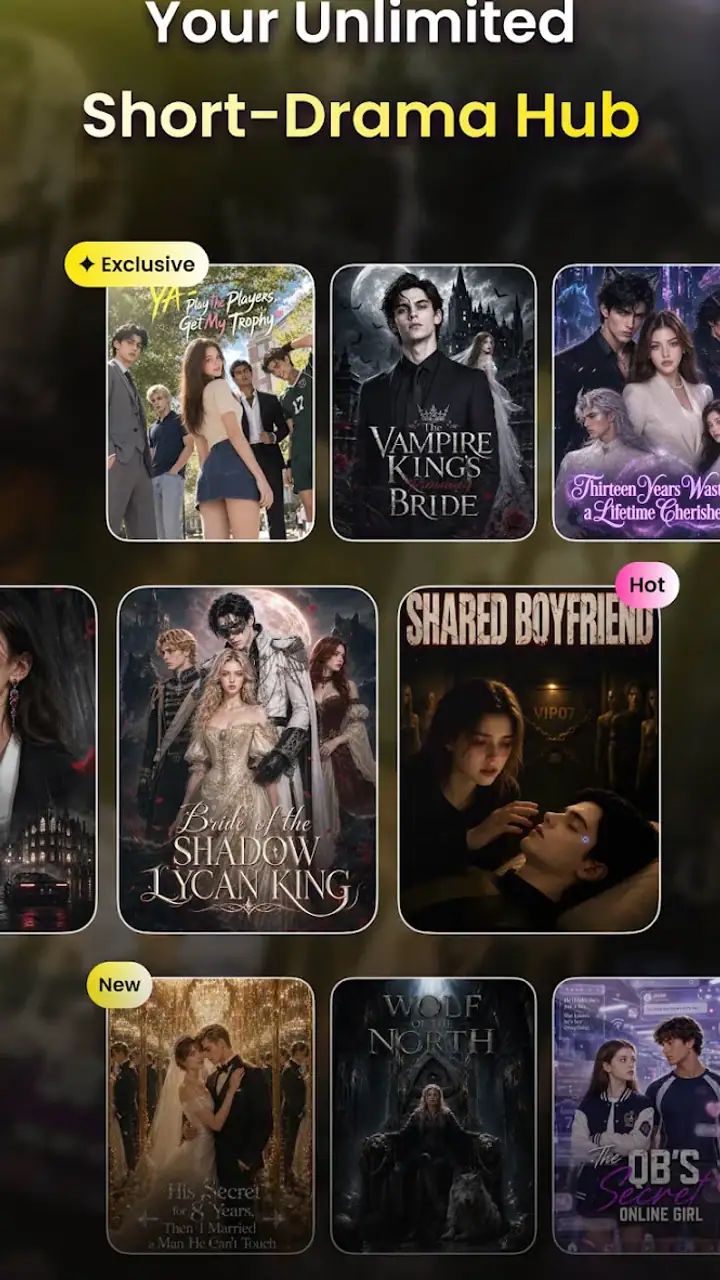
BlinkDrama - Short Dramas is a mobile entertainment app focused on short-form serialized stories. It offers compact drama episodes designed for quick viewing sessions, with plots that typically include romance, family conflict, suspense, or unexpected twists. Episodes are presented in a vertical, mobile-friendly format, making the app suitable for watching during breaks or whenever you only have a few minutes available.
Is BlinkDrama - Short Dramas free to download and use?
The app can generally be downloaded without an upfront charge, but access to all content may not be completely free. Some episodes, series, or viewing features can require in-app purchases, virtual coins, subscriptions, or watching advertisements. Before spending money, users should review the pricing information shown inside the app and check whether recurring billing, promotional offers, or separate content unlocks apply.
Does BlinkDrama require an internet connection?
BlinkDrama primarily relies on an internet connection to load drama episodes, advertisements, account information, and other online features. Streaming over Wi-Fi is usually the most comfortable option because video can consume considerable mobile data. Depending on the version and the title, offline downloads may not be available, so users should not assume that every episode can be saved for viewing without an active connection.
Are the dramas on BlinkDrama suitable for children?
Not every story on BlinkDrama is necessarily appropriate for children. Short dramas may include mature romance, intense arguments, threats, betrayal, violence, or emotionally difficult themes, depending on the production. Parents should review the app’s age rating and inspect individual series before allowing younger users to watch. Device-level parental controls and purchase restrictions are also recommended if children use the same phone.
Does BlinkDrama support subtitles or multiple languages?
Language support can vary between the application interface and the individual dramas available in the catalog. Some productions may offer subtitles or translated captions, while others may be limited to their original language. Users who depend on subtitles should check the details of a specific series and test the playback settings before purchasing coins or unlocking episodes, since translation availability may differ from one title to another.
Pros
- Episodes are short and easy to watch during quick breaks.
- Large selection of dramatic stories across multiple genres.
- Vertical video format feels natural on mobile devices.
- New episodes and story updates help keep the catalog engaging.
- Simple interface makes browsing and starting a drama straightforward.
Cons
- Frequent ads may interrupt viewing
- especially for free users.
- Many episodes require coins or in-app purchases to unlock.
- Some storylines rely heavily on clichés and predictable twists.
- Video quality and subtitles may vary between different dramas.
- Offline viewing options may be limited or unavailable for some content.


